Quickstart
Send your first trace to the Ratel Platform in five minutes.
Create a project, send one run, and watch it arrive.
Sign in
Open cloud.ratel.sh and sign in with GitHub or Google.
Without access you see a waitlist screen, and we email you when a spot opens. To ask for access sooner, book a call.
Create a project and get an API key
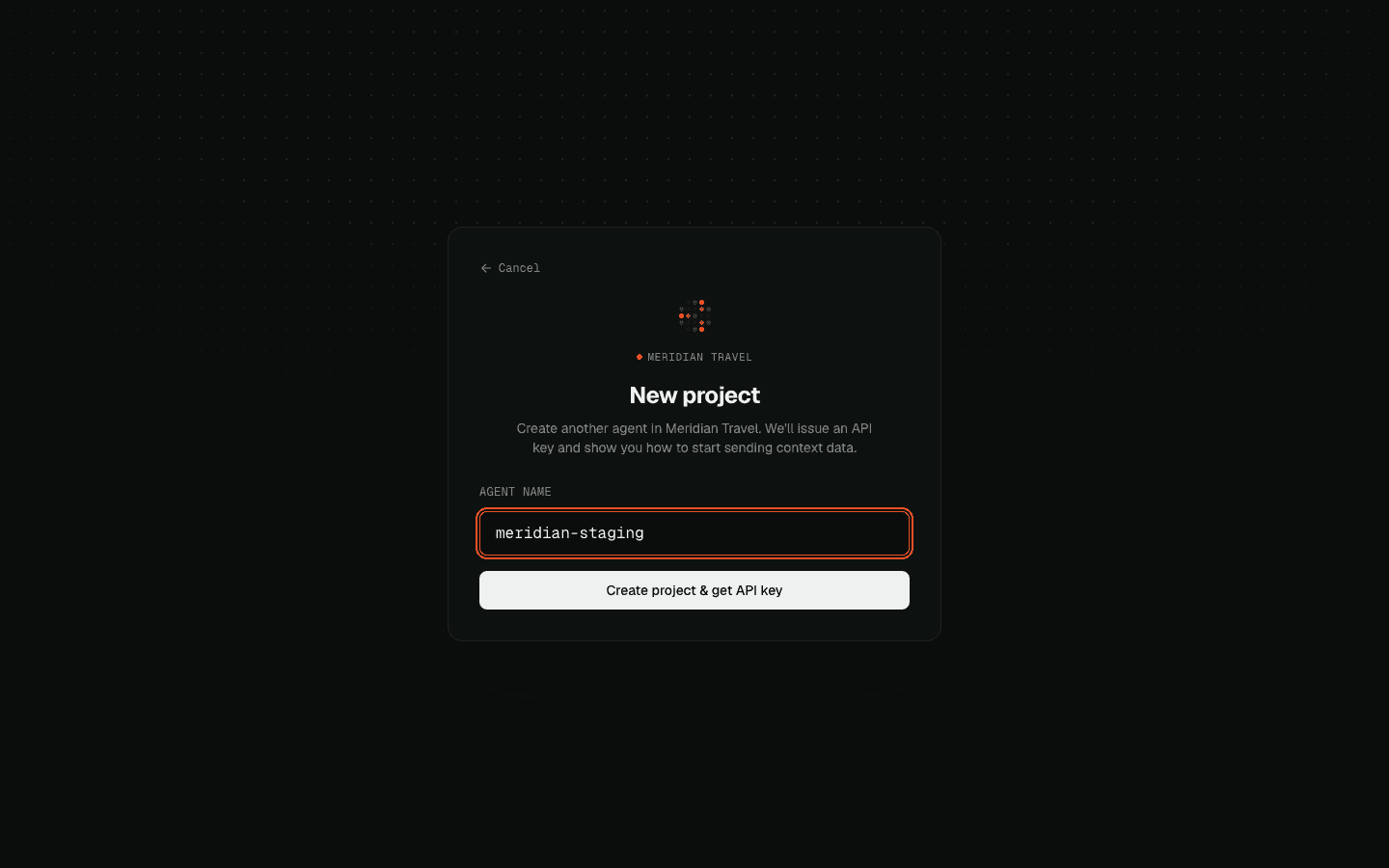
On Create project & get API key, name the project after your agent and submit. A project is one agent.
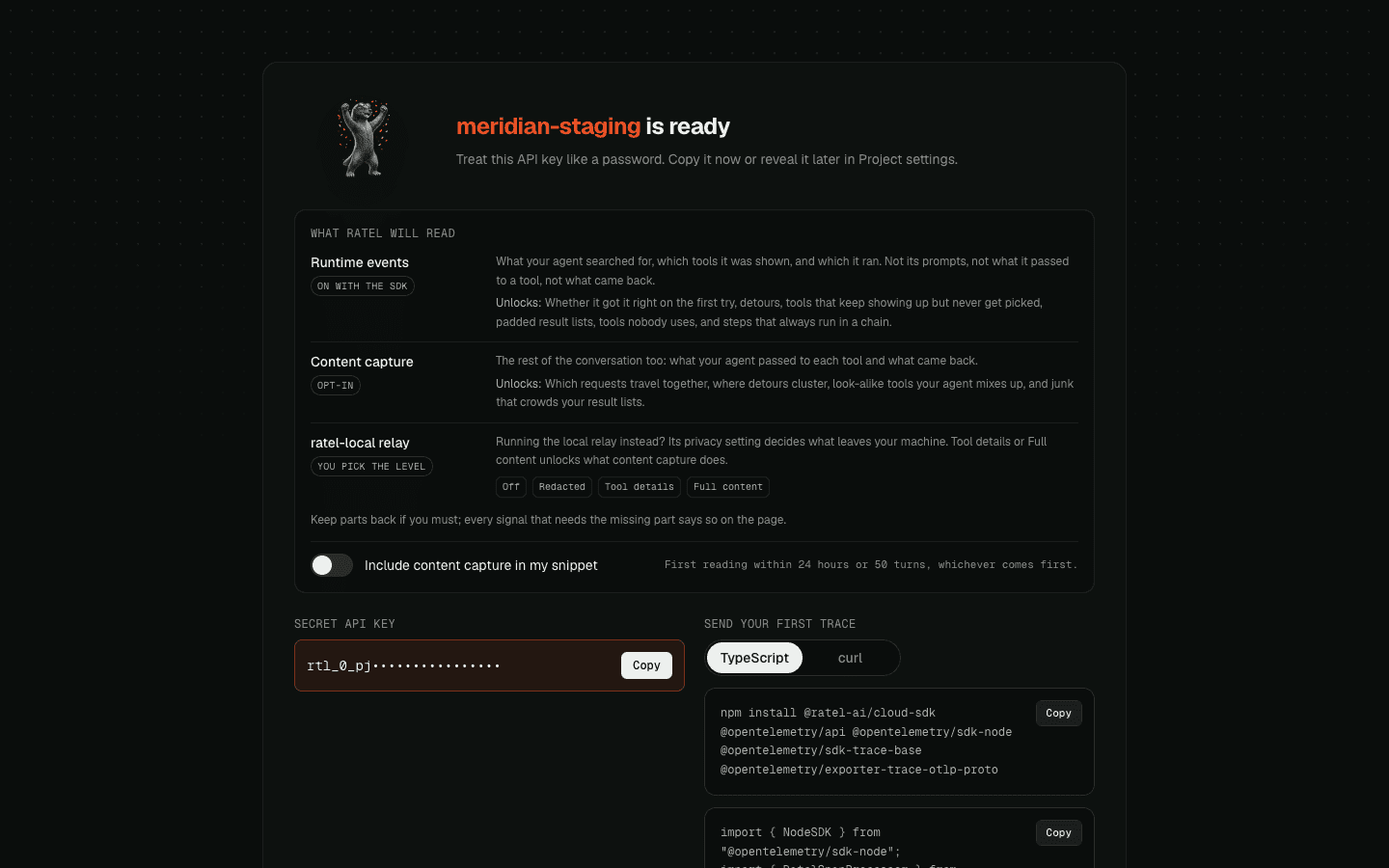
Copy the key and export it:
export RATEL_API_KEY=<your-key>Treat the key like a password. Copy it now or reveal it later in Project settings.
Send a run
Pick one. Each sends one model call and expects 202 Accepted.
Nothing to install. Good for a first check of your key.
curl -i https://cloud.ratel.sh/v1/traces \
  -H "Authorization: Bearer $RATEL_API_KEY" \
  -H "Content-Type: application/json" \
  -d '{ "resourceSpans": [{ "scopeSpans": [{ "spans": [{
        "traceId": "'"$(openssl rand -hex 16)"'", "spanId": "'"$(openssl rand -hex 8)"'",
        "name": "chat claude-sonnet-4-6", "kind": 3,
        "startTimeUnixNano": "'"$(date +%s)"'000000000",
        "endTimeUnixNano": "'"$(date +%s)"'900000000",
        "attributes": [
          { "key": "gen_ai.operation.name", "value": { "stringValue": "chat" } },
          { "key": "gen_ai.provider.name", "value": { "stringValue": "anthropic" } },
          { "key": "gen_ai.request.model", "value": { "stringValue": "claude-sonnet-4-6" } },
          { "key": "gen_ai.usage.input_tokens", "value": { "intValue": "1200" } },
          { "key": "gen_ai.usage.output_tokens", "value": { "intValue": "180" } }
        ] }] }] }] }'
The response is 202 Accepted with {"accepted":1,"calls":1,"spans":1}.
RatelSpanProcessor forwards gen_ai.* and ratel.* spans to the Platform. Exporters you already run keep working.
npm install @ratel-ai/cloud-sdk @opentelemetry/api@1.9 @opentelemetry/sdk-node@0.223 \
  @opentelemetry/sdk-trace-base@2 @opentelemetry/exporter-trace-otlp-proto@0.223
@ratel-ai/cloud-sdk needs @opentelemetry/api below 1.10, so pin the versions above.
import { NodeSDK } from "@opentelemetry/sdk-node";
import { RatelSpanProcessor } from "@ratel-ai/cloud-sdk/otel";
import { trace } from "@opentelemetry/api";

const sdk = new NodeSDK({
  serviceName: "my-agent",
  spanProcessors: [
    // Reads RATEL_API_KEY.
    new RatelSpanProcessor({ endpoint: "https://cloud.ratel.sh/v1/traces" }),
  ],
});
sdk.start();

// One model call. Your agent's instrumentation records these for you.
trace
  .getTracer("quickstart")
  .startSpan("chat claude-sonnet-4-6", {
    attributes: {
      "gen_ai.operation.name": "chat",
      "gen_ai.provider.name": "anthropic",
      "gen_ai.request.model": "claude-sonnet-4-6",
      "gen_ai.usage.input_tokens": 1200,
      "gen_ai.usage.output_tokens": 180,
    },
  })
  .end();

await sdk.shutdown(); // flush before exit
node index.mjsinit() registers OpenTelemetry providers that export to the Platform.
pip install 'ratel-ai-telemetry[otlp]'from opentelemetry import trace
from ratel_ai_telemetry import init
# Reads RATEL_API_KEY.
handle = init(endpoint="https://cloud.ratel.sh/v1/traces", service_name="my-agent")
# One model call. Your agent's instrumentation records these for you.
with trace.get_tracer("quickstart").start_as_current_span("chat claude-sonnet-4-6") as span:
span.set_attributes({
"gen_ai.operation.name": "chat",
"gen_ai.provider.name": "anthropic",
"gen_ai.request.model": "claude-sonnet-4-6",
"gen_ai.usage.input_tokens": 1200,
"gen_ai.usage.output_tokens": 180,
})
handle.shutdown() # flush before exitpython main.pyWatch it arrive
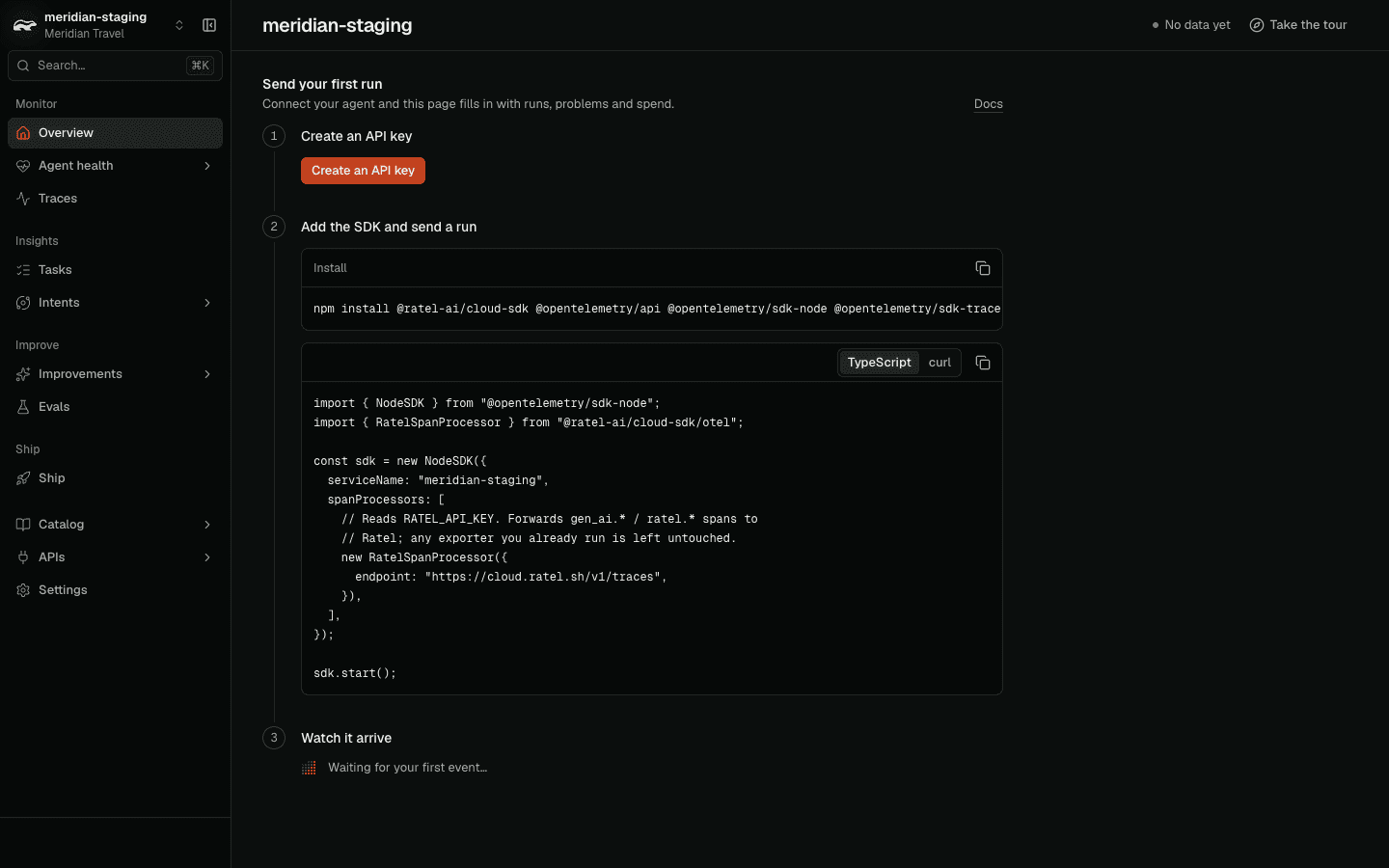
Open your project. Until data arrives, Overview shows the first-run checklist and waits. Within seconds of your 202, the run shows under Recent runs.
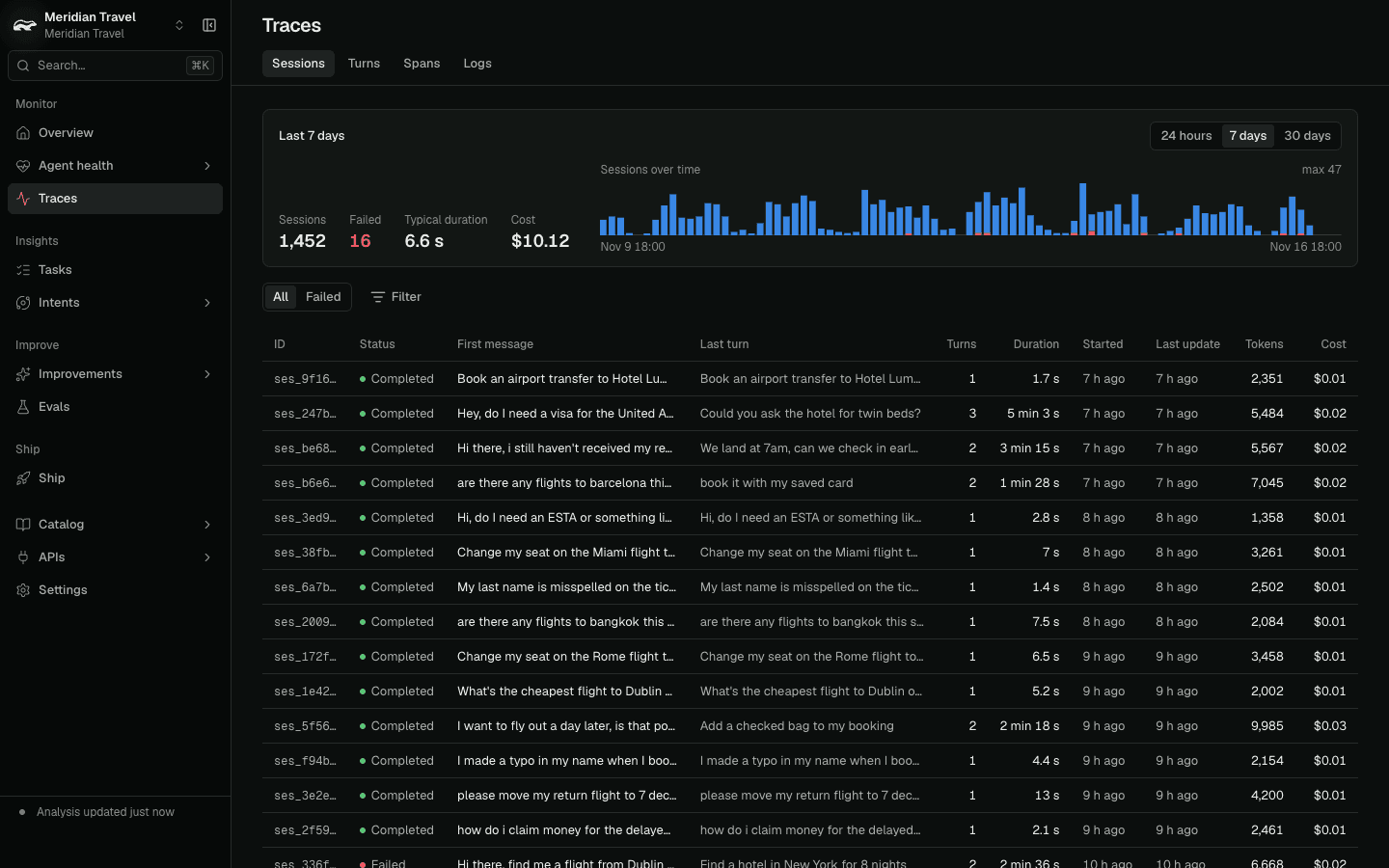
Open Monitor > Traces and pick the Spans tab to see the model call, its tokens and its cost. Sessions and Turns fill in once your agent sends whole runs: an agent span with its model and tool calls inside.
Explore while you wait
- Sample project: a new organization gets a sample project with weeks of agent activity, marked as sample data. It does not count toward your plan's projects.
- Guided tour: it starts the first time you open a project, and Take the tour on Overview starts it again. It walks through Overview, Agent health, Traces, Catalog and Quality.
Ask your coding agent
Paste this into Claude Code, Cursor or Codex in your agent's repository:
Send this agent's traces to the Ratel Platform. Read
https://www.ratel.sh/docs/platform/quickstart.md and
https://www.ratel.sh/docs/platform/send-data.md, pick the setup that fits
this codebase, read the key from RATEL_API_KEY, and turn on
OTEL_INSTRUMENTATION_GENAI_CAPTURE_MESSAGE_CONTENT=SPAN_AND_EVENT only if I agree.